For teams building with Codex · Self-hosted
AI sets the pace.
Your team sets the course.
Requirements, discussions and progress live on your team's own server. Everyone starts a local Codex session from a requirement, the findings go back to it, and who is doing what is plain to see. Code stays on each developer's machine.
Requirements, discussions and progress live on your team's own server. Start a local Codex session from a requirement, and the findings go back to it. Code stays on your machine.
Client: macOS · Windows | Server: Ubuntu / Linux
Team · Requirements
- Retry failed payment callbacks
- Export reports as CSV
Local · Codex session
› Read requirement REQ-128
› Edit src/payment/callback.ts
› Run tests
✓ Tests passed · confirm to post findings
SuDuo in three points
Talk where the requirement is
Comments, rooms and attachments sit next to the requirement. Share your Codex into a room and teammates without the code can ask how things work today.
Progress at a glance
The board, Overview and My work show who is on what, what has stalled, and which requirements changed after work started — no status meeting needed.
Start from a requirement, code stays local
One click opens a local Codex session with the requirement in it, and the findings go back. The server runs on your own infrastructure.
Why SuDuo
Everyone has an AI now. Staying in sync got harder.
Each developer codes with AI in their own terminal, while requirements, discussions and the AI's work end up scattered. SuDuo brings them back to one requirement.
Before
- Requirements in a tracker, discussion in a chat app, files in a shared drive
- Developers paste requirements into the AI, and whatever context they miss means rework
- What the AI did and found is known only to the developer who ran it
- Finding out where things stand takes a meeting
With SuDuo
- Comments, rooms and attachments all hang off the same requirement
- Start work from a requirement; Codex reads the requirement, comments and attachments itself
- Ask Codex to post its findings as a comment; once you confirm, the whole team can see them
- The board, Overview and My work show progress directly
How teams work in it
Three things, around one requirement
Real screenshots of the English interface, and one illustration. The demo data is made up.
Start from a requirement, post the findings back
Click Start session on a requirement, and SuDuo opens Codex in that project's folder on your computer. The requirement card and the tools to look up the rest come with it, so Codex can read comments and attachments on its own. When you want the team to see its findings, ask Codex to post them as a comment; nothing goes out until you confirm it in SuDuo.
- Pick a local folder once per project; after that, start work from any requirement
- Approvals, commands and changes on one timeline, with checkpoints you can restore in one click
- If the requirement changes after you start, My work tells you
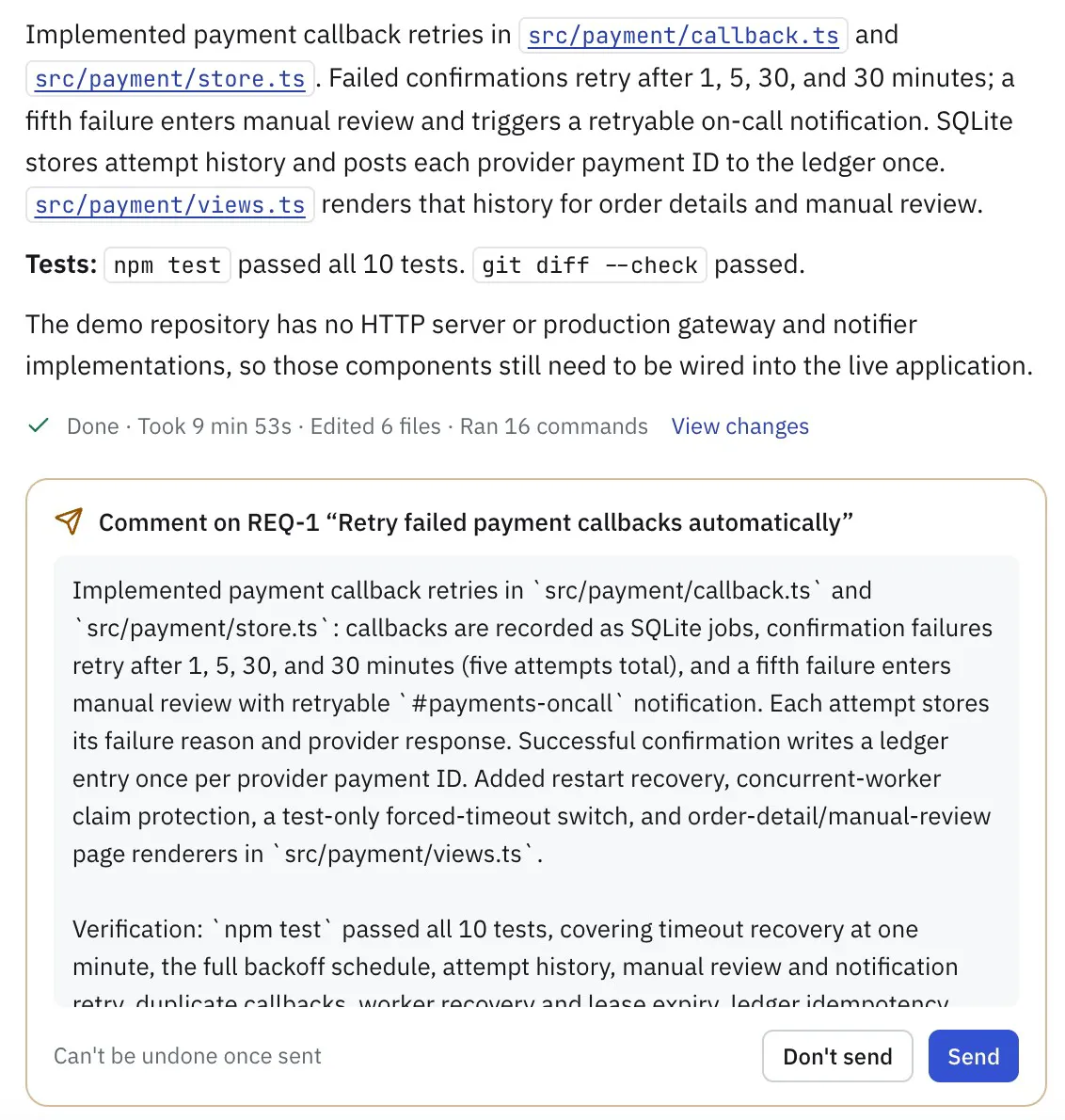
- The comment Codex drafted: which requirement it goes to and what it says, shown to you first
- It reaches the requirement only when you press Send, and can't be taken back
Ask a shared Codex in the room
Share your Codex into a room and teammates can @mention it there. It looks through the code in that project's folder on your computer, read-only, and answers in the message's thread — so a product manager without the code can still ask how something works today.
- You choose which room and for how long, and can turn it off anytime
- Read-only, so it never changes your code; its answers and what it did are posted in the room and can include code
How a shared agent works Team server · Room
Read-onlyRead-onlyAlex's computer · Project folder
- Reads the message and the discussion before it
- Looks through the code, read-only
- Posts the answer back to the thread
The owner turns sharing on, chooses how long it lasts, and can turn it off anytime.
Progress without the status meeting
The board lays requirements out by status, so who is on what is plain to see. Overview shows the status mix, recent movement and stalled requirements; My work gathers what needs you across projects. You know what to push first without a status meeting.
- Board and list views, seven statuses, assignees, and a
REQ-nnumber for every requirement - Requirements that have stalled are listed on their own in Overview
- Every requirement keeps its full activity history — who changed what, and when
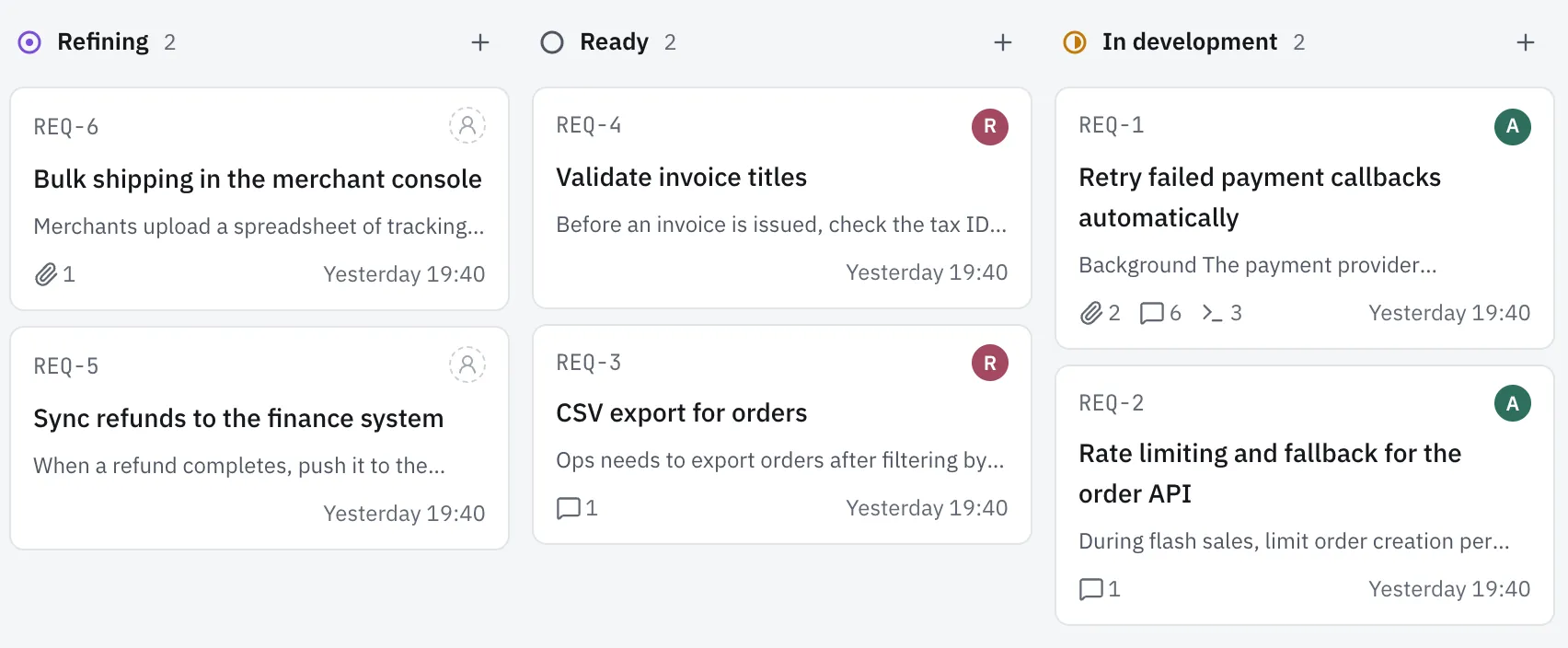
- One column per status, with the number of requirements in it
- The assignee's avatar: who is on it, at a glance
- Board and list views, seven statuses, assignees, and a
Where your data lives
Requirements with your team. Code on your machine.
The team server keeps requirements and discussions; each developer's computer keeps the code and runs Codex. You deploy the server yourselves — SuDuo has no central service.
Team server
Deployed by your team
- Projects and requirements
- Comments and attachments
- Rooms and messages
- Accounts and activity history
Each developer's computer
Runs the SuDuo client
- Code repositories
- Codex sessions and approvals
- Codex configuration and model credentials
- Which local folder belongs to which project
Codex calls it directly
Your model serviceOpenAI or a compatible provider
Repositories and personal sessions are never uploaded to your team's server. When Codex works, it sends the context it needs — including code it has read — straight to the model service you configured; when you share your agent into a room, its answers and what it did are posted there.
How it works, and where your data livesWho it's for
Who SuDuo suits, honestly
SuDuo is still early. Here is who it suits today, and who it doesn't yet.
A good fit
- Development teams of 3–30 people who build, or plan to build, with the Codex CLI
- Product, QA and developers going back and forth on requirements
- Teams that don't want to hand their repositories to a third-party platform, and are happy to run one server
Not yet a fit
- Solo developers: the Codex CLI on its own is enough
- Teams that want a hosted service: SuDuo is self-hosted only
- Organizations that need admins, fine-grained permissions or approval flows: not in this version
Get started
Two ways to start
See what it does first, or set it up on your team's server.
Watch the 1.5-minute demo
A recording of the real app: asking a shared Codex in the room, starting work from a requirement, and posting the findings back once you confirm. Every feature is explained on the Product page.
Watch the demoDeploy it for your team
One Linux server with Docker (Ubuntu 22.04 / 24.04) and a single command; everyone installs the desktop app (trial) on macOS or Windows, or runs it from source.
Self-hosting guideUsing SuDuo at a company?
Start right away, and register by email within 30 days of starting. Registration is currently free. Individuals using SuDuo for personal study, research or hobby projects with no anticipated commercial application, and schools, public research organizations, charities and government institutions, use it free with no registration.
FAQ
Frequently asked questions
Is our code uploaded to the team server?
Not automatically. Codex runs on your computer, in the folder you chose; the team server only gets what you send it yourself: requirements, comments, messages and attachments (plus any confirmed versions published with earlier versions, which can include files from the project folder). The exception is an agent shared into a room: its answers and what it did are posted there and can include code.
Do we have to use OpenAI?
No. Enter the address and API key of a compatible service, including one you host yourselves, under Settings → Model service in SuDuo, and Codex uses it instead; this changes ~/.codex, so the Codex CLI in your own terminal changes too. If you do use OpenAI, a ChatGPT sign-in or an OpenAI API key works as well.
How much work is it to run?
Each team deploys once: one Linux server with Docker, and one script for installing, upgrading, backing up and restoring. Everyone runs the client on their own computer: install the desktop app for macOS or Windows (a trial, not signed yet), or run it from source.
Does it cost anything?
Personal study, research and hobby projects with no anticipated commercial application, and schools, public research organizations, charities and government institutions, use it free with no registration. Use by a company or other for-profit organization is commercial use: start right away and register by email within 30 days. Registration is currently free.
How is it different from cloud AI coding platforms?
Cloud platforms usually pull your repository into their own cloud environment and run their AI there. With SuDuo, the Codex on each developer's computer reads files and runs commands locally and sends model requests straight to the model service you configured; team data lives on the server you deploy, and there is no central SuDuo account.